
Part 3 of three. Part 1 covers what the app is. Part 2 goes deep on the peel-off effect and holographic shimmer. This one walks through everything else: die-cut rendering, tilt sensors, haptics, persistence, and the cross-platform architecture.
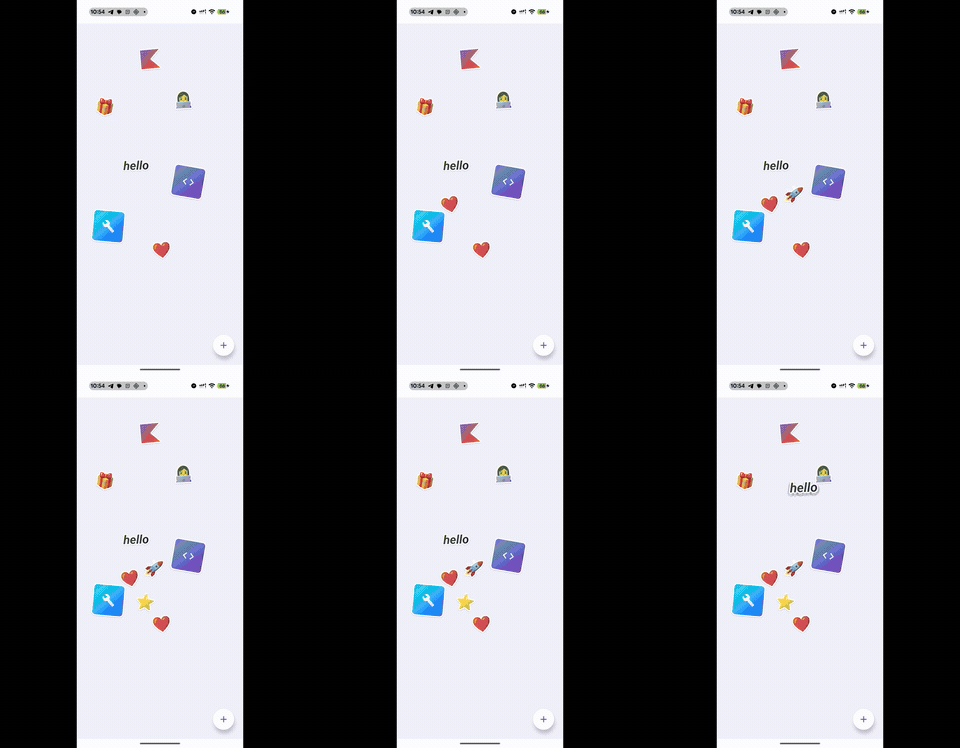
Part 2 covered the peel-off grab and holographic shimmer. But a sticker canvas that feels complete needs more than two cool effects. Die-cut outlines that work on any shape. Tilt sensors bridged across platforms. Haptic feedback mapped to the right gestures. Canvas state that survives app restarts. All wired together through five expect/actual boundaries.
This post is the rest of the build.
Die-cut outlines: the stamp technique
Real vinyl stickers have a white border where they're cut from the backing sheet. In StickerExplode, every sticker gets this treatment. The challenge: stickers aren't simple rectangles. They're emoji, Canvas-drawn paths, icons. Arbitrary shapes.
How it works
The stickerCutout modifier uses drawWithContent to draw the content multiple times with different effects layered underneath:
- Draw the content 16 times, each offset in a different direction around a circle, all tinted black. This creates the shadow.
- Draw the content 16 more times, offset around a circle at a smaller radius, all tinted white. This creates the outline.
- Draw the actual content on top.
private fun Modifier.stickerCutout(
    outlineWidth: Dp = 3.dp,
    liftFraction: Float = 0f,
) = this.drawWithContent {
    val outlinePx = outlineWidth.toPx()
    val pad = outlinePx * 3
    val layerBounds = Rect(-pad, -pad, size.width + pad, size.height + pad)

    // Shadow properties change with lift
    val shadowAlpha = 0.06f + liftFraction * 0.06f
    val shadowSpread = outlinePx + (1.dp.toPx() + liftFraction * 3.dp.toPx())
    val shadowOffsetY = 1.dp.toPx() + liftFraction * 3.dp.toPx()

    // Shadow: 16 copies, black tint
    val shadowPaint = Paint().apply {
        colorFilter = ColorFilter.tint(
            Color.Black.copy(alpha = shadowAlpha / 2f), BlendMode.SrcIn
        )
    }
    for (i in 0 until 16) {
        val angle = (2.0 * PI * i / 16).toFloat()
        val dx = shadowSpread * cos(angle)
        val dy = shadowSpread * sin(angle) + shadowOffsetY
        drawIntoCanvas { canvas ->
            canvas.save()
            canvas.translate(dx, dy)
            canvas.saveLayer(layerBounds, shadowPaint)
        }
        drawContent()
        drawIntoCanvas { canvas ->
            canvas.restore()
            canvas.restore()
        }
    }

    // White outline: 16 copies, white tint
    val whitePaint = Paint().apply {
        colorFilter = ColorFilter.tint(Color.White, BlendMode.SrcIn)
    }
    for (i in 0 until 16) {
        val angle = (2.0 * PI * i / 16).toFloat()
        val dx = outlinePx * cos(angle)
        val dy = outlinePx * sin(angle)
        drawIntoCanvas { canvas ->
            canvas.save()
            canvas.translate(dx, dy)
            canvas.saveLayer(layerBounds, whitePaint)
        }
        drawContent()
        drawIntoCanvas { canvas ->
            canvas.restore()
            canvas.restore()
        }
    }

    drawContent()
}
Why 16 copies
With n copies evenly spaced at radius r, the maximum gap between adjacent stamps is 2r * sin(PI/n). At 16 copies and 3dp radius:
gap = 2 * 3dp * sin(PI/16) ≈ 1.17dp
Sub-pixel on any phone screen. The outline looks perfectly smooth. 8 copies leaves visible scalloping at the corners. 32 looks the same as 16 but doubles the draw calls.
BlendMode.SrcIn
BlendMode.SrcIn is why this works on arbitrary shapes. ColorFilter.tint(Color.White, BlendMode.SrcIn) replaces every opaque pixel with white while preserving the alpha channel. Transparent areas stay transparent. The white stamp exactly matches the shape of whatever content you drew, whether it's a heart emoji, the Kotlin logo path, or a gradient-filled rounded rectangle.
Same trick for the shadow: tint with semi-transparent black instead of white.
Dynamic shadow tied to lift
The shadow parameters interpolate with liftFraction from the peel-off effect (covered in Part 2). Resting stickers have a tight, faint shadow. Lifted stickers have a wider, darker shadow offset further down. This connects the die-cut rendering to the drag interaction. They're two separate systems but liftFraction ties them together.
Tilt sensing across platforms
The holographic shimmer (Part 2) needs real-time tilt data from the device's motion sensors. Android and iOS have completely different sensor APIs.
The common interface
data class TiltData(val pitch: Float = 0f, val roll: Float = 0f)

expect class TiltSensorProvider {
    fun start(callback: (TiltData) -> Unit)
    fun stop()
}

@Composable
expect fun rememberTiltSensorProvider(): TiltSensorProvider
Both pitch and roll are normalized to [-1, 1], where the extremes are 90-degree tilts. The holographic shader only sees this normalized data. It doesn't know or care which platform it's on.
Android: SensorManager
actual class TiltSensorProvider(private val context: Context) {
    actual fun start(callback: (TiltData) -> Unit) {
        val sm = context.getSystemService(Context.SENSOR_SERVICE) as SensorManager
        val sensor = sm.getDefaultSensor(Sensor.TYPE_ROTATION_VECTOR) ?: return

        val rotationMatrix = FloatArray(9)
        val orientation = FloatArray(3)

        listener = object : SensorEventListener {
            override fun onSensorChanged(event: SensorEvent) {
                SensorManager.getRotationMatrixFromVector(rotationMatrix, event.values)
                SensorManager.getOrientation(rotationMatrix, orientation)
                val pitch = (orientation[1] / (PI / 2.0)).toFloat().coerceIn(-1f, 1f)
                val roll = (orientation[2] / (PI / 2.0)).toFloat().coerceIn(-1f, 1f)
                callback(TiltData(pitch, roll))
            }
            override fun onAccuracyChanged(sensor: Sensor?, accuracy: Int) {}
        }
        sm.registerListener(listener, sensor, SensorManager.SENSOR_DELAY_GAME)
    }

    actual fun stop() {
        listener?.let { sensorManager?.unregisterListener(it) }
    }
}
TYPE_ROTATION_VECTOR is a fusion sensor. Android combines accelerometer, gyroscope, and magnetometer data internally. Much more stable than reading raw accelerometer values. SENSOR_DELAY_GAME (~20ms) is fast enough for smooth animation without burning the battery.
iOS: CMMotionManager
actual class TiltSensorProvider {
    private val motionManager = CMMotionManager()

    actual fun start(callback: (TiltData) -> Unit) {
        if (!motionManager.isDeviceMotionAvailable()) return
        motionManager.deviceMotionUpdateInterval = 1.0 / 30.0
        motionManager.startDeviceMotionUpdatesToQueue(
            NSOperationQueue.mainQueue
        ) { motion, _ ->
            motion?.let {
                val pitch = (it.attitude.pitch / (PI / 2.0)).toFloat().coerceIn(-1f, 1f)
                val roll = (it.attitude.roll / (PI / 2.0)).toFloat().coerceIn(-1f, 1f)
                callback(TiltData(pitch, roll))
            }
        }
    }

    actual fun stop() {
        motionManager.stopDeviceMotionUpdates()
    }
}
Core Motion gives Euler angles in radians. Dividing by PI/2 normalizes to [-1, 1]. 30 Hz update rate.
Spring-smoothed sensor data
Raw sensor readings are jittery. Instead of writing a manual low-pass filter, I feed the values into Compose's spring animation:
@Composable
fun rememberTiltState(): State<TiltData> {
    val provider = rememberTiltSensorProvider()
    var rawPitch by remember { mutableStateOf(0f) }
    var rawRoll by remember { mutableStateOf(0f) }

    DisposableEffect(provider) {
        provider.start { data ->
            rawPitch = data.pitch
            rawRoll = data.roll
        }
        onDispose { provider.stop() }
    }

    val smoothPitch by animateFloatAsState(
        targetValue = rawPitch,
        animationSpec = spring(dampingRatio = 0.8f, stiffness = 200f),
    )
    val smoothRoll by animateFloatAsState(
        targetValue = rawRoll,
        animationSpec = spring(dampingRatio = 0.8f, stiffness = 200f),
    )

    return remember {
        derivedStateOf { TiltData(smoothPitch, smoothRoll) }
    }
}
This works because animateFloatAsState continuously animates toward its target. When sensor readings jump, the spring absorbs the noise. Damping of 0.8 (nearly critically damped) tracks the actual tilt closely without oscillating. Stiffness of 200 keeps latency to about 50ms, which is imperceptible.
A damped harmonic oscillator is actually what a low-pass filter approximates anyway. The spring spec just lets you tune it with two intuitive parameters instead of figuring out cutoff frequencies.
derivedStateOf wraps the output so the shader sees a single State<TiltData> that updates smoothly.
Haptic feedback
Every interaction has a corresponding haptic. The common code defines four types:
enum class HapticType {
    LightTap,       // grab a sticker
    MediumImpact,   // drop a sticker, double-tap zoom
    HeavyImpact,    // reserved for future use
    SelectionClick, // tap to bring forward, open tray, pick from tray
}

expect class HapticFeedbackProvider {
    fun perform(type: HapticType)
}
Android implementation
actual class HapticFeedbackProvider(private val view: View) {
    actual fun perform(type: HapticType) {
        val constant = when (type) {
            HapticType.LightTap -> HapticFeedbackConstants.CLOCK_TICK
            HapticType.MediumImpact -> HapticFeedbackConstants.CONFIRM
            HapticType.HeavyImpact -> HapticFeedbackConstants.LONG_PRESS
            HapticType.SelectionClick -> {
                if (Build.VERSION.SDK_INT >= Build.VERSION_CODES.UPSIDE_DOWN_CAKE) {
                    HapticFeedbackConstants.GESTURE_START
                } else {
                    HapticFeedbackConstants.CONTEXT_CLICK
                }
            }
        }
        view.performHapticFeedback(constant)
    }
}
Uses View.performHapticFeedback(), which respects the user's system haptic settings. On API 34+, GESTURE_START gives a crisper click for selection actions.
iOS implementation
actual class HapticFeedbackProvider {
    private val lightGenerator = UIImpactFeedbackGenerator(
        style = UIImpactFeedbackStyle.UIImpactFeedbackStyleLight)
    private val mediumGenerator = UIImpactFeedbackGenerator(
        style = UIImpactFeedbackStyle.UIImpactFeedbackStyleMedium)
    private val heavyGenerator = UIImpactFeedbackGenerator(
        style = UIImpactFeedbackStyle.UIImpactFeedbackStyleHeavy)
    private val selectionGenerator = UISelectionFeedbackGenerator()

    actual fun perform(type: HapticType) {
        when (type) {
            HapticType.LightTap -> lightGenerator.impactOccurred()
            HapticType.MediumImpact -> mediumGenerator.impactOccurred()
            HapticType.HeavyImpact -> heavyGenerator.impactOccurred()
            HapticType.SelectionClick -> selectionGenerator.selectionChanged()
        }
    }
}
Generators are pre-allocated. Apple's docs recommend this to avoid latency on first trigger.
Why the mapping matters
The grab/drop pairing is the most important one. Light haptic on grab, medium on drop. It creates a physical narrative: you picked something up (light touch) and put it down (heavier thud). This is the same principle iOS uses for its own drag-and-drop haptics.
Selection clicks are for UI actions (tap to front, open tray, pick a sticker). They feel distinct from impact haptics, which are for physical interactions. Mixing them up makes the app feel wrong even if you can't articulate why.
State persistence
The entire canvas state persists across launches. Every sticker position, rotation, scale, z-index, the complete history log, and the ID/z counters.
The repository
@Serializable
data class CanvasState(
    val stickers: List<StickerItem> = emptyList(),
    val history: List<HistoryEntry> = emptyList(),
    val nextId: Int = 0,
    val zCounter: Int = 0,
)

class CanvasRepository(private val dataStore: DataStore<Preferences>) {
    private val json = Json { ignoreUnknownKeys = true }

    companion object {
        private val CANVAS_STATE_KEY = stringPreferencesKey("canvas_state")
    }

    suspend fun loadCanvasState(): CanvasState? {
        val prefs = dataStore.data.first()
        val raw = prefs[CANVAS_STATE_KEY] ?: return null
        return try {
            json.decodeFromString<CanvasState>(raw)
        } catch (_: Exception) { null }
    }

    suspend fun saveCanvasState(state: CanvasState) {
        dataStore.edit { prefs ->
            prefs[CANVAS_STATE_KEY] = json.encodeToString(state)
        }
    }
}
Everything serialized as a single JSON string in one DataStore key. Not the most efficient storage format, but simple and debuggable (you can read the raw JSON if something goes wrong).
ignoreUnknownKeys = true on the JSON config is forward-compatibility insurance. If I add a new field to StickerItem in a future version, old persisted data still loads. Unknown keys get skipped, new fields get their default values.
Debounced saves
During a drag gesture, updateStickerTransform fires every frame (60 times per second). Serializing the full canvas state on every frame would thrash DataStore. Instead, saves are debounced with a 500ms delay:
private var saveJob: Job? = null

private fun debouncedSave() {
    saveJob?.cancel()
    saveJob = viewModelScope.launch {
        delay(500)
        repository.saveCanvasState(
            CanvasState(
                stickers = _stickers.value,
                history = _history.value,
                nextId = nextId,
                zCounter = zCounter,
            )
        )
    }
}
Every call cancels the previous pending save and schedules a new one. The actual write only happens when the user stops interacting for 500ms or drops the sticker (which also calls debouncedSave).
Platform-specific DataStore paths
DataStore needs a file path, which is platform-dependent.
// commonMain
const val DATA_STORE_FILE_NAME = "sticker_explode_prefs.preferences_pb"

fun createDataStore(producePath: () -> String): DataStore<Preferences> =
    PreferenceDataStoreFactory.createWithPath(
        produceFile = { producePath().toPath() }
    )

expect fun createPlatformDataStore(): DataStore<Preferences>
Android resolves the path from Activity.filesDir:
// androidMain
private lateinit var appDataStore: DataStore<Preferences>

fun initDataStore(filesDir: String) {
    if (!::appDataStore.isInitialized) {
        appDataStore = createDataStore { "$filesDir/$DATA_STORE_FILE_NAME" }
    }
}

actual fun createPlatformDataStore(): DataStore<Preferences> = appDataStore
iOS resolves from NSDocumentDirectory:
// iosMain
actual fun createPlatformDataStore(): DataStore<Preferences> {
    val directory = NSFileManager.defaultManager.URLForDirectory(
        directory = NSDocumentDirectory,
        inDomain = NSUserDomainMask,
        appropriateForURL = null,
        create = false,
        error = null,
    )!!.path!!
    return createDataStore { "$directory/$DATA_STORE_FILE_NAME" }
}
Android needs the extra initDataStore() step because filesDir comes from the Activity context. It gets called in MainActivity.onCreate(). iOS can resolve the documents directory statically.
The sticker tray
The picker is a Material 3 ModalBottomSheet with a LazyVerticalGrid of all 16 sticker types.
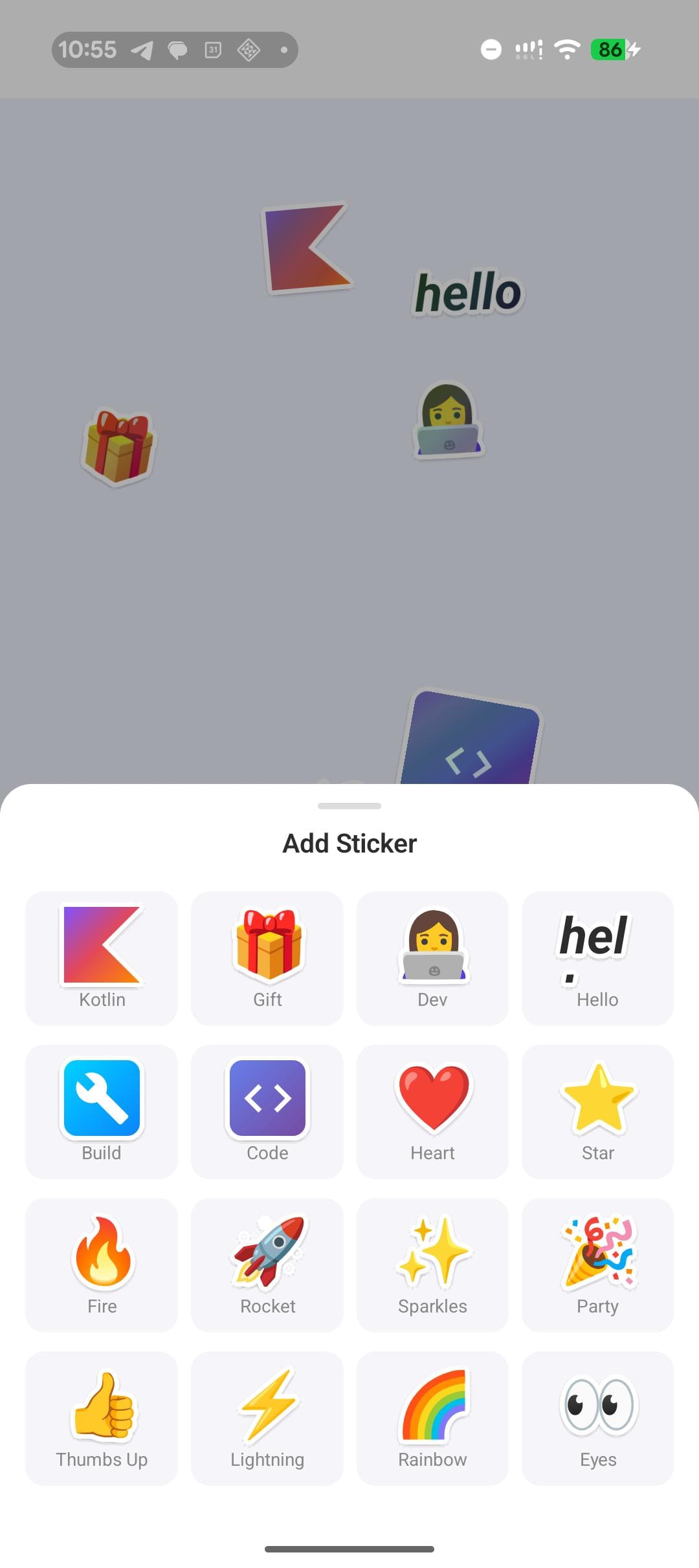
Each grid item has a press animation:
val interactionSource = remember { MutableInteractionSource() }
val isPressed by interactionSource.collectIsPressedAsState()
val scale by animateFloatAsState(
    targetValue = if (isPressed) 0.85f else 1f,
    animationSpec = spring(dampingRatio = 0.6f, stiffness = 400f),
)
val bgColor by animateColorAsState(
    targetValue = if (isPressed) Color(0xFFE8E8FF) else Color(0xFFF5F5FA),
)
Squish to 85% on press, spring back on release. Background tints purple at the same time. High stiffness (400) makes it snappy.
Each tray item renders the same StickerVisual composable used on the canvas, without the die-cut outline or holographic effect. What you see in the tray is what ends up on the canvas.
The ViewModel
CanvasViewModel owns two StateFlows and handles all mutations:
class CanvasViewModel(private val repository: CanvasRepository) : ViewModel() {

    private val _stickers = MutableStateFlow<List<StickerItem>>(emptyList())
    val stickers: StateFlow<List<StickerItem>> = _stickers.asStateFlow()

    private val _history = MutableStateFlow<List<HistoryEntry>>(emptyList())
    val history: StateFlow<List<HistoryEntry>> = _history.asStateFlow()

    private var nextId = 0
    private var zCounter = 0

    init {
        viewModelScope.launch {
            val saved = repository.loadCanvasState()
            if (saved != null && saved.stickers.isNotEmpty()) {
                _stickers.value = saved.stickers
                _history.value = saved.history
                nextId = saved.nextId
                zCounter = saved.zCounter
            } else {
                _stickers.value = defaultStickers
                nextId = defaultStickers.size
            }
        }
    }

    fun addSticker(type: StickerType) {
        val id = nextId++
        zCounter++
        val sticker = StickerItem(
            id = id,
            type = type,
            initialFractionX = 0.15f + Random.nextFloat() * 0.5f,
            initialFractionY = 0.2f + Random.nextFloat() * 0.4f,
            rotation = -15f + Random.nextFloat() * 30f,
            zIndex = zCounter.toFloat(),
        )
        _stickers.value = _stickers.value + sticker
        _history.value = _history.value + HistoryEntry(
            stickerType = type,
            timestampMillis = currentTimeMillis(),
        )
        debouncedSave()
    }

    fun updateStickerTransform(
        id: Int, offsetX: Float, offsetY: Float, scale: Float, rotation: Float,
    ) {
        _stickers.value = _stickers.value.map { s ->
            if (s.id == id) s.copy(
                offsetX = offsetX, offsetY = offsetY,
                pinchScale = scale, rotation = rotation,
            ) else s
        }
        debouncedSave()
    }

    fun bringToFront(id: Int) {
        zCounter++
        _stickers.value = _stickers.value.map { s ->
            if (s.id == id) s.copy(zIndex = zCounter.toFloat()) else s
        }
        debouncedSave()
    }
}
New stickers get random positions within the center area of the canvas (0.15..0.65 horizontal, 0.2..0.6 vertical) and random rotation between -15 and +15 degrees. This scatters them naturally instead of stacking them on top of each other.
Every mutation calls debouncedSave(). The view model doesn't know when or if the save actually happens. It just signals intent and the debounce logic handles the rest.
The five expect/actual boundaries
Stepping back, the full project has five places where common code delegates to platform code:
| Boundary | Common type | Android | iOS |
|---|---|---|---|
| Tilt sensor | TiltSensorProvider |
SensorManager + TYPE_ROTATION_VECTOR |
CMMotionManager |
| Haptics | HapticFeedbackProvider |
View.performHapticFeedback() |
UIImpactFeedbackGenerator |
| Holographic renderer | HolographicBaseNode |
AGSL RuntimeShader (API 33+) or fallback |
Fallback only |
| DataStore path | createPlatformDataStore() |
Activity.filesDir |
NSDocumentDirectory |
| System clock | currentTimeMillis() |
System.currentTimeMillis() |
NSDate().timeIntervalSince1970 * 1000 |
Each boundary is a narrow interface. The common code defines what it needs (normalized tilt data, a perform(HapticType) function, a DataStore instance) and doesn't care how it's implemented. The platform code is a thin wrapper around native APIs.
None of these boundaries leaked during development. I never had to import an Android or iOS type in common code, and I never needed to pass platform context through the UI layer. The rememberTiltSensorProvider() and rememberHapticFeedback() composables handle context injection on each platform.
What I'd change
Modifier nodes were worth the boilerplate. The holographic shimmer redraws 30 times per second on every sticker. Modifier.composed {} would have triggered recomposition each time. Modifier nodes run draw() directly in the draw pass. If I'd used the older API I think I would have hit performance problems pretty quickly.
I was about to write a manual low-pass filter for the tilt sensors before realizing that a nearly-critically-damped spring does the same thing. Ended up using springs for physics simulation, UI feedback, sensor smoothing, and state transitions. Two parameters, covers everything. They also handle interruption without any special state machines, which I didn't appreciate until I started grabbing stickers mid-bounce.
The ShaderBrush fallback works on iOS but the AGSL version on Android is noticeably smoother during fast tilts. If I start this over I'd look at Metal shaders for iOS.
There's also no undo/redo. The debounced save handles persistence fine but if you accidentally drag a sticker off screen, tough luck. A command stack would fix that.
The full project is about 800 lines of shared Compose code across commonMain. MIT licensed.
Built with Kotlin 2.1 and Compose Multiplatform 1.7. Tested on Pixel 8 Pro and iPhone 15 Pro.